You keep every line. The client reads one. The van, the driver, the parking and the congestion charge each have their own rate, tax and total on the job. Put them in a Transport group, and the quote says Transport, with one figure and a sentence under it.
Making a Group
- On the job’s Services tab, add a service or open one to change it
- Under On the quote, choose Inside a new group… and name the group as the client should see it, for example Transport. Or choose an existing group, Inside Transport
- Save. The group has its own row on the Services table, with its lines under it and its total beside it
On the group’s row, type the sentence the client reads under it, for example “Van, driver, parking and congestion”. Change the name the same way. Return saves, Escape puts it back.
On the Mac, the service sheet has the same On the quote choice, grouped lines carry a tag, and the job’s groups are listed under the table with their name, sentence and total.
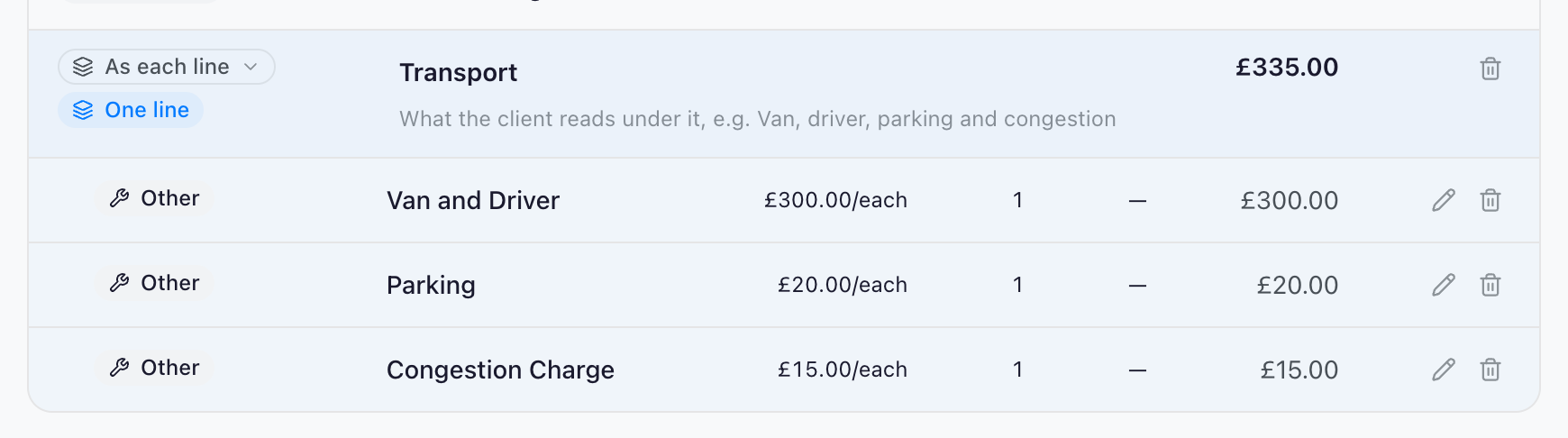
What the Client Reads
On the quote, the invoice and the hire agreement, and on the online approval page, the group is one line where its first line would have been: its name, the sentence under it, and what its lines come to after their own discounts. The lines themselves are not printed.
What is charged does not change. The total, the VAT and every deal are worked out from the lines exactly as before, so a group can never make a job cost more or less.
In your accounting package the invoice carries one line per group too. A group that mixes taxed and untaxed services goes across as one line of each, so the VAT lands where the lines put it. See Accounting Overview.
A Group’s Type
Every service has a type, such as Labour, Transport or Other, and the price bar and the quote’s breakdown add services up by type. A Transport group whose parking and congestion lines are typed Other would read as Transport on the quote and as Other in the breakdown.
So a group can have a type of its own. Choose it on the group’s row:
- A type, such as Transport: every line in the group counts as Transport, and so does any line you add to it or move into it. A grouped line’s own type follows the group, and says so
- As each line: each line keeps its own type
To give one line a different type, move it out of the group first. Setting a group back to As each line leaves its lines as they are.
Changing and Removing a Group
- Move a line into another group, or back to A line of its own, from On the quote when you change the service
- Remove a group from its row. Its services stay on the job, each on its own line on the quote again
- Copying a job copies its service groups, types and sentences with it
Good to Know
- Service groups are separate from the Equipment tab’s groups. For the equipment’s own “quote as one line”, see Clean Quotes
- Anybody who can change a job’s services can group them; a locked job cannot be changed
- Service groups are made and changed on the web and the Mac
Next Steps
- Clean Quotes: Folding equipment groups, and sentences on the quote
- Quotes & Invoices: Services, rates and the job’s price
- The Text Library: Text lines you use again